

Quick Printing Guide: Saddle-Stitching

Saddle-stitching is a cost-effective method used after the printing process to bind together pages of items such as catalogues, brochures or magazines. Once the item has been printed, it is typically fed into stitcher where the stitching process is automated – binding the pages together with metal staples.
Definition of Saddle-Stitching:
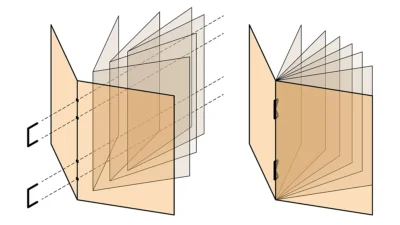
Saddle stitching is way of producing catalogue/brochures/magazines etc. by wire stitching (staples) over a saddle. The wire pierces the spine of the brochure in (usually) two places and is clenched at the centre of the book. This finishing method can be used for 8 page to over 200 page books, using one or many sections, which go inside each other. Each finished copy is then trimmed on three edges.
This process is usually carried out at the printing plant although 3rd party finishers are sometimes used when the printer doesn’t have the appropriate equipment in-house.
Potential issues to consider
When designing for saddle-stitched products, there are some things to watch out for:
- Page/code numbers should be kept away from the edge of the page and preferably centred. When printed by web-offset, the design must allow for variation in folding, this can and does result in copy being trimmed off with uneven borders between pages. Use the pages at the centre of sections if designs or illustrations need to run across a pair of pages. A 16-page brochure should have the running design on pages 4 & 5, 8 & 9, the centre pages and 12 & 13. This allows checking to be carried out more often and more easily.
- As the brochure becomes thicker, the inside pages will be shortened and a rough guide is for every 1mm in book thickness allow 1mm less on the page width. An A4 portrait 3mm thick brochure will have the centre pages at 207mm not 210mm. A very thick brochure can result in slight tearing at the ‘V’ of the spine. The thicker the brochure, the less satisfactory it looks.
- The wires at the centre of the brochure can fail to hold the pages in if the brochure is subject to a lot of use. Spine gluing the centre section can help to minimize this problem. If using a repeating design that bleeds, some variation will show. Equally a solid, finishing just short of the paper edge and repeating on all pages will show variation when the brochure is flicked through.
Production issues
- Grain direction should (where possible) be parallel to the spine of the book. Allow adequate trims for the head, tail and foredge: thin brochures 3mm, medium brochures 5mm, thick brochures 7mm or more.
- Before printing in volume, take a sheet/section off the press and fold and trim accurately to size. This is an excellent guide to seeing how the brochure/magazine/catalogue or section will look before the job is run off. With several sections, these can be placed inside each other and viewed to see no positioning problems etc. are likely to occur.
- Covers on 135gsm paper or thicker should be scored to avoid cracking.
- Landscape books require more trim at head and tail, especially if bleeds are used: no less than 7mm per page top and bottom. If necessary increase the edges of the print that may bleed and possibly join them instead of leaving a white gutter. Also with 2-up work, do not allow a white gutter between copies if they bleed.
- On all sections allow the back half (when folded) at the foredge, to be at least 6mm wider than the front half, this allows the finisher to feed more positively and at greater speeds. On smaller brochures, the position of two wires can be a problem, the allowance for each wire is 1/2” and the minimum space between 1 3/4” giving an overall 2 3/4” (70mm).
Found this useful? We have loads more print guides and tips, check them out here.